



Skip to content
Request a Quote

My Account

  • United States
    • English Europe
    • Français
    • Español
    • Deutsch
    • Nederlands
  • Dickson Logo
  • Solutions
        • Explore solutions built for your industry

          Dickson provides comprehensive environmental monitoring solutions, including software, equipment, and services, for industries requiring regulatory compliance worldwide.

        • Learn More
        • By Use
          • Vaccine Storage Monitoring
          • Cleanroom Monitoring
          • Temperature Monitoring & Measurement
          • Laboratory Monitoring
          • Relative Humidity Monitoring
          • Absolute & Differential Pressure Monitoring
          • Ambient Monitoring
          • Cold Room & Refrigeration Monitoring
          • Chamber Monitoring
          • Incubator Monitoring
        • By Industry
          • Pharmaceutical
          • Research
          • Medical Devices
          • Hospital & Healthcare
          • Third-Party Logistics
          • Manufacturing & Production
          • Food & Beverage
          • Aerospace
        • Monitoring Solutions
          • DicksonOne
            • DicksonOne Mobile App
          • OCEAView™ On-Premise
          • Transition to OCEAView from ThermoServer
  • Products
    • Data Loggers
    • Chart Recorders & Supplies
    • Software
    • Sensors
    • Accessories
  • Services
    • Calibration
      • Calibration Club
    • Installation
    • Validation
    • Training
    • Mapping
  • Resources
        • Support
          • Knowledge Base
          • Manuals
        • Library
          • Blog
          • Whitepapers
          • Press Room
        • Compliance
          • A2LA Certificate
          • ISO 9001 Certification
          • Sustainability at Dickson
          • FDA 21 CFR Part 11
          • GxP Compliance
  • About
    • About Us
    • Catalog
    • Locations
    • Careers
  • Contact Us
  • My Account
  • United States
    • English Europe
    • Français
    • Español
    • Deutsch
    • Nederlands
  • 0
0

Request a Demo

Dickson Logo
  • Dickson Logo
  • Solutions
        • Explore solutions built for your industry

          Dickson provides comprehensive environmental monitoring solutions, including software, equipment, and services, for industries requiring regulatory compliance worldwide.

        • Learn More
        • By Use
          • Vaccine Storage Monitoring
          • Cleanroom Monitoring
          • Temperature Monitoring & Measurement
          • Laboratory Monitoring
          • Relative Humidity Monitoring
          • Absolute & Differential Pressure Monitoring
          • Ambient Monitoring
          • Cold Room & Refrigeration Monitoring
          • Chamber Monitoring
          • Incubator Monitoring
        • By Industry
          • Pharmaceutical
          • Research
          • Medical Devices
          • Hospital & Healthcare
          • Third-Party Logistics
          • Manufacturing & Production
          • Food & Beverage
          • Aerospace
        • Monitoring Solutions
          • DicksonOne
            • DicksonOne Mobile App
          • OCEAView™ On-Premise
          • Transition to OCEAView from ThermoServer
  • Products
    • Data Loggers
    • Chart Recorders & Supplies
    • Software
    • Sensors
    • Accessories
  • Services
    • Calibration
      • Calibration Club
    • Installation
    • Validation
    • Training
    • Mapping
  • Resources
        • Support
          • Knowledge Base
          • Manuals
        • Library
          • Blog
          • Whitepapers
          • Press Room
        • Compliance
          • A2LA Certificate
          • ISO 9001 Certification
          • Sustainability at Dickson
          • FDA 21 CFR Part 11
          • GxP Compliance
  • About
    • About Us
    • Catalog
    • Locations
    • Careers
  • Contact Us
  • My Account
  • United States
    • English Europe
    • Français
    • Español
    • Deutsch
    • Nederlands
  • 0

Dickson Support Database

DicksonOne

  • Devices
    • Reset the Min/Max On a Device
    • Replace a Device
    • Export the Device Graph
    • Download Data Manually from a Device
    • Device Loses Power or Loses Network Connection
    • Delete a Device
    • Archive a Device
    • Understand the Device Summary Data
    • Add Devices
    • Change Device Settings
    • Find the MAC Address of a Device
  • DWE (WiFi & Ethernet)
    • DWE Quick Start Guide
    • Turn HTTPS ON/OFF
    • Find the MAC Address of a Device
    • DWE Error Codes
    • DWE/2 Black Button Above Sensor
  • Account and Billing
    • Subscribe to DicksonOne Emails
    • Purchase a DicksonOne System
    • Expired Subscription
    • Activating an Account with Monthly Credit/Debit Card Billing
    • Account Owner and Manage Access User
    • Single Sign On
    • Accessing and Enabling API Keys
    • DicksonOne Account Features
    • Default Device Settings
    • Create Your DicksonOne Account
    • Credit Card Payment Failed – Stripe
    • Getting Started with DicksonOne
  • Interface
    • Equipment
    • Understand the Device Graph
    • Sensor Information and Behaviors
    • Audit Trail
    • Add or Remove Reference Lines
    • Monitoring Points
    • Dashboards
    • Custom Dashboards
    • Floor Plans
  • Touchscreen (WiFi & Ethernet, AC Power)
    • Set a Passcode
    • Export Data from the Touchscreen Data Logger
    • Touchscreen (TWE/TWP and TSB) Quick Start Guide
  • RF System (RFL Data Logger & Gateway)
    • RF Gateway Quick Start Guide
    • RF Logger Quick Start Guide
    • RF System Troubleshooting
    • Deleting a RF Gateway
    • RF Logger Firmware Updates
    • RF Gateway Firmware Updates
    • Exporting Data from the RF Logger
    • Register RF Loggers
    • Register an RF Gateway
    • Securing the LoRaWAN RF Gateway
  • Network and Technical
    • Connect a Device to Ethernet
    • Change Logs
    • IT Requirements and Notes
    • Turn HTTPS ON/OFF
    • DWE Error Codes
    • WiFi vs. Ethernet
    • Creating WiFi Settings Files
    • Find the MAC Address of a Device
  • Firmware and Hardware
    • Replace a Device
    • Replaceable Sensor Disconnect
    • Replacing the Sensor on a Device
    • Connect a Device to WiFi
    • Connect a Device to Ethernet
    • Relay Sensor Wiring Diagram
    • Manage Firmware Settings
    • Update the Device Firmware
  • Users and Contacts
    • User Roles
    • Suspend a User
    • Edit or Delete a User/Contact
    • Add a Contact
    • Add a New User
    • User Access and Permissions
  • Locations
    • Get Started With Locations and General Structure
    • Add or Delete a Location
  • Exports and Reports
    • Select the Right Report
    • Create a Report
    • View Report History
    • Edit Recipients On a Report
    • Edit a Report
    • Export the Device Data
    • Export the Account Data
  • Twilio Integration Overview
    • Twilio Integration FAQs
    • Sub-Accounts within Twilio
    • Disconnect Your Twilio Account From DicksonOne
    • Set a Twilio Rate Limit
    • Best Practices And Reducing Twilio Costs
    • Connect Your Twilio Account to DicksonOne
    • Creating a Twilio Account
    • Country Codes Requiring a Twilio Account Integration
    • Twilio Troubleshooting
    • Twilio Integration Overview
  • Alarms and Notifications
    • Single Alarm Pause and Bulk Alarm Pause
    • Bulk Acknowledgement and Commenting
    • Alert Snooze
    • Alert Reasons
    • Too Many Escalations for a Given Condition
    • Alarm Escalation
    • Create a Template from an Existing Device’s Alarm
    • Apply an Alarm Template to Multiple Devices
    • Apply an Alarm Template to a Device
    • Alarm Options
    • Alarm Delay Behavior
    • Delete an Alarm/Unapply Alarm Template from a Device​
    • Edit Alarms
    • Create a Not Reporting Alarm
    • Create a Custom Alarm
    • Create an Alarm Template
    • Warnings vs. Excursions
    • Creating Alarm Schedules
    • Review and Acknowledge Alarm Alerts
  • Follet Refrigerator and Freezer Integration
    • Download these instructions as a PDF
    • FAQ’s
    • Installing the Network card
    • Connect to Dickson One
    • Setup
    • Follett Network Interface Card Overview and Requirements
  • Helmer iSeries Equipment Integration
    • Connect your iSeries Equipment to DicksonOne (Advanced)
    • Troubleshooting an iSeries Integration
    • Connect your iSeries Equipment to DicksonOne (Basic/DHCP)

Chart Recorders

  • Why Did the Chart Stop Turning?
  • How to Change Charts
  • Why Isn’t the Chart Keeping Time or Running Slow?
  • Why are the Pen Traces Erratic?
  • How to Change Pens
  • Why Won’t the Chart Recorder Rotate?

Legacy Products

  • WiZARD2
    • How to move a WiZARD2 system to a new PC without losing data
    • WiZARD2 software locked up while adding a device
    • WiZARD Ethernet Installation and Usage

Manuals

  • Chart Recorders Manuals
    • VFC70 Manual
    • SC3 Manual
    • PW8 Manual
    • PW4 Manual
    • KT856 Manual
    • SL4/SK4 Manual
    • TH8 Manual
    • New 8″ Chart Recorders (Various models prefaced with TH8 and KT8) Manual
    • KT8 Manual
    • KT6 Manual
    • ET855 Manual
  • Data Loggers
    • PR150/350 Manual
    • SK550/TK550 Manual
    • SP425/TP425 Manual
    • TM320/325 Manual
    • SM300/320/325/420 Manual
    • TSB Manual
    • PR525 Manual
    • PR325 Manual
    • PR125 Manual
    • DWE Manual
    • HT350 Manual
    • TP125 Manual
    • SP125/SP175 Manual
    • HT300 Manual
    • DSB Manual
    • ES120 Manual
    • DBL Manual
  • Other
    • TC700/TH700 Manual
    • RL200 Manual
  • Wizard2
    • Wizard2 Manual

Advanced

  • Employee Documents
    • Test Article 1
  • Helpful
    • Common Part List
    • MultiTech Gateway Firmware Update Notes
    • Oceaview Cobalt X Firmware Update Notes
  • Oceaview
    • Oceaview Application
      • Oceaview OnPrem
        • Oceaview Network Diagram For On-premise
        • Oceaview On Premise Installation Oceaview
      • Oceaview Cloud
        • Alert Rules While Using Phone Calls
      • Oceaview Mobile
        • Updating FW Using a Local File
        • Oceaview Mobile Unable to Start Logging Due to Lock
    • Oceaview Hardware
      • Cobalt X OV
        • Updating Cobalt Logger that is stuck on black screen with clicking noise
  • DicksonOne
    • DicksonOne Hardware
      • How to Find D1 Logger Mac Address
      • TWE/TWP
        • TWE/TWP Passcode Reset
View Categories
  • Home
  • Dickson Support
  • DicksonOne
  • Exports and Reports
  • Export the Account Data

Export the Account Data

About Exporting the Account Data #

  • This feature is limited to Account Owners only, though other users are able to create exports
  • This feature allows the Account Owner to create an export that will include all devices in the entire account versus having to create an export for each device

How to Export Data #

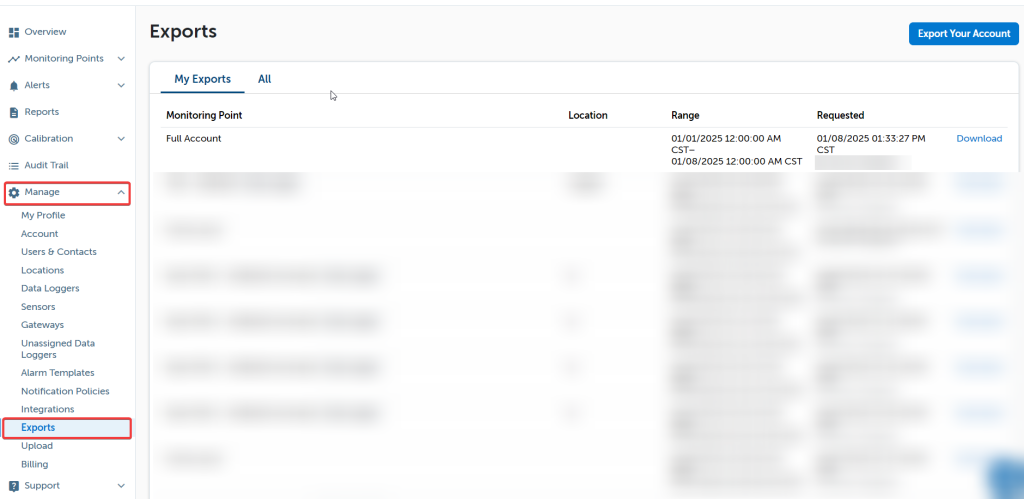
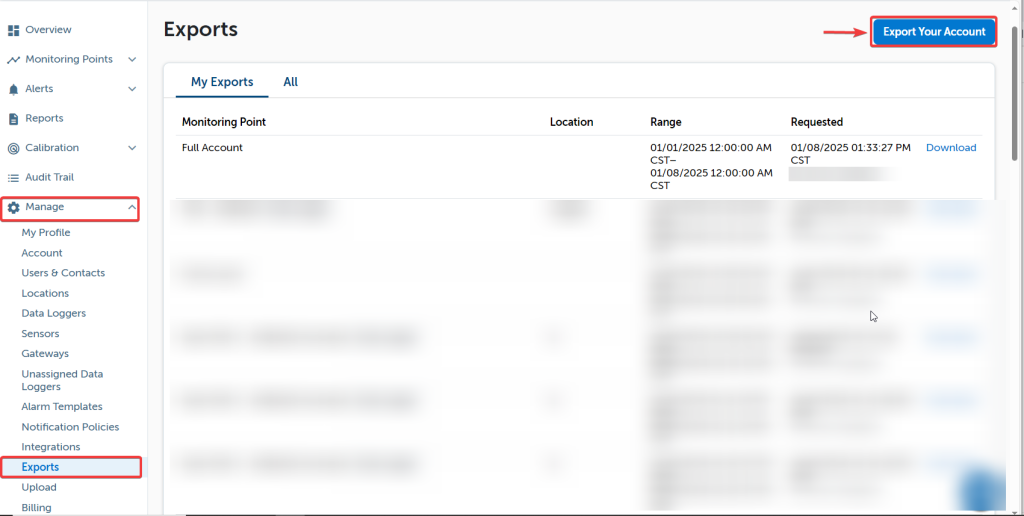
To export data from all devices on your DicksonOne account, go to Manage > Exports
Click Export Your Account at the top right of the page
    To export all data collected from your account, leave the Starts at and Ends at fields blank and click Export.

    To set a date range for your data export, use the calendar and slider tools that will appear when you click on the date fields. After you have set the start and end date for your export, click Export.

    You will receive an email from noreply@dicksonone.com with a .zip file attached. Inside the file will be an excel spreadsheet with the data you exported.

    Depending on the number of loggers and how much data each one has, the email may take some time to arrive. If you do not receive the file, add noreply@dicksonone.com to you approved senders list.

    You may also want: Export Device Data

    Was this article helpful?
    Updated on January 8, 2025
    Table of Contents
    • About Exporting the Account Data
    • How to Export Data
    Dickson Logo

    Subscribe to our Newsletter

    ADDRESSES

    usa flag

    USA

    930 S Westwood Ave,
    Addison, IL, 60101, USA
    Phone: (630) 563-4209
    Email: supportinfo@dicksondata-debug.freshy.dev

    France flag

    France

    720 rue Louis Lépine,
    34000 Montpellier, France
    Phone: +33(0)4 99 13 67 30

    Malaysia flag

    Malaysia

    Dickson Unigage Sdn. Bhd.
    Wisma LYL, G-02
    No. 12. Jalan 51A/223, Section 51A
    46100, Petaling Jaya, Selangor
    Phone: +60374940758
    Email: contact@dicksondata.my

    PRODUCTS

    • Data Loggers
    • Accessories
    • Disclaimer

    RESOURCES

    • About Us
    • Terms of sale
    • Contact Us
    • Blog
    • Imprint

    SOCIAL MEDIA

    Facebook

    © 2026 Dickson Data. All Rights Reserved.

    Privacy - Terms

    Manage Consent
    To provide the best experiences, we use technologies like cookies to store and/or access device information. Consenting to these technologies will allow us to process data such as browsing behavior or unique IDs on this site. Not consenting or withdrawing consent, may adversely affect certain features and functions.
    Functional Always active
    The technical storage or access is strictly necessary for the legitimate purpose of enabling the use of a specific service explicitly requested by the subscriber or user, or for the sole purpose of carrying out the transmission of a communication over an electronic communications network.
    Preferences
    The technical storage or access is necessary for the legitimate purpose of storing preferences that are not requested by the subscriber or user.
    Statistics
    The technical storage or access that is used exclusively for statistical purposes. The technical storage or access that is used exclusively for anonymous statistical purposes. Without a subpoena, voluntary compliance on the part of your Internet Service Provider, or additional records from a third party, information stored or retrieved for this purpose alone cannot usually be used to identify you.
    Marketing
    The technical storage or access is required to create user profiles to send advertising, or to track the user on a website or across several websites for similar marketing purposes.
    Manage options Manage services Manage {vendor_count} vendors Read more about these purposes
    View preferences
    {title} {title} {title}
    Manage Consent
    To provide the best experiences, we use technologies like cookies to store and/or access device information. Consenting to these technologies will allow us to process data such as browsing behavior or unique IDs on this site. Not consenting or withdrawing consent, may adversely affect certain features and functions.
    Functional Always active
    The technical storage or access is strictly necessary for the legitimate purpose of enabling the use of a specific service explicitly requested by the subscriber or user, or for the sole purpose of carrying out the transmission of a communication over an electronic communications network.
    Preferences
    The technical storage or access is necessary for the legitimate purpose of storing preferences that are not requested by the subscriber or user.
    Statistics
    The technical storage or access that is used exclusively for statistical purposes. The technical storage or access that is used exclusively for anonymous statistical purposes. Without a subpoena, voluntary compliance on the part of your Internet Service Provider, or additional records from a third party, information stored or retrieved for this purpose alone cannot usually be used to identify you.
    Marketing
    The technical storage or access is required to create user profiles to send advertising, or to track the user on a website or across several websites for similar marketing purposes.
    Manage options Manage services Manage {vendor_count} vendors Read more about these purposes
    View preferences
    {title} {title} {title}
    0
      Your Cart
      Your cart is emptyReturn to Shop
      Continue Shopping